For the longest time, I felt that simplicity was either underrated or entirely unmentioned in business's mission and value statements.
The first person I saw promoting simplicity was Steve Jobs. He was known for meticulously designing and expecting that Apple products be made as simple as humanly possible. However, even after everyone has had an Apple product in their pocket at one point in their life, businesses still find the concept of simplicity to be so elusive or perhaps vague that it somehow fails to considered as an important value.
I would like to take this opportunity to explain conceptually, why I think simplicity should be a value for your business and what a focus on simplicity could result in.
In the early 2000s, I heard a line from a conference about software development: Simple isn't Easy.
I took that statement to mean that making something complex into something, is hard. You need to take the time and mental effort to make a complex concept into something that is understandable and digestible.
The result should be that you and others only need to comprehend the essence of the concept and then can competently use it.
It is a considerable task, but one that moves us forward in our complex world. We need to simplify complexity just so that we can see the way forward. Once the path is clear, things are.. well, simple. And we as humans, like simple.
In fact, we find a high degree of complexity destructive. The archeologist Joseph Tainter came up with a thesis in his book “the Collapse of Complex Societies”. He argues that societies like the Ancient Romans, Egyptians and Mayans collapsed due to complexities that were not able to be addressed at the time with a lack of people who could be able to read, do math and keep up with complex laws.
Complex product design can kill too. I recall in University reading about a medical radiation machine that had such a complex array of buttons on its interface that operators gave patients x300 more radiation than was required (the Therac-25 in 1986).
So what we need to do is remove complexity where we can - certainly not add it - and abstract complexity where we cannot.
Unfortunately, we sometimes do this process wrong. In that same period in the early 2000s, there was a movement in the software development community that preached 'optimising for developer happiness'.
During this time, some innovations came around that abstracted away - a form of simplification - the developer's need to understand what the underlying hardware was doing. This let the industry be able to focus on simplifying concepts in the software layer itself. Developers would only need to focus on recurring patterns that solve familiar business or software requirements and do away with the consideration of how that software would need to eventually run on the hardware.
While this abstraction and simplification did optimise for developer happiness, the resulting software was not optimised to run on hardware. Some new developers did not even learn how the hardware works “under the hood”.
This lead to many years of lost productivity fixing (now legacy) applications to work better with hardware. All the while competing with time allocated for higher business priorities to release new product features.
Fortunately, today - and only recently - software developers are realising that in order to simplify a complex concept, you need to consider all its relevant moving parts. There is a new movement using a new language that is considered to have a 'hardware/software co-design'. It has shown that once you really understand a concept and its scope, you can come up with innovative (“zero cost”) abstractions that make the entire industry move forward.
Lastly, I won't be able to end this post that started with Steve Jobs without talking about simplifying your focus. Jobs was known to relentlessly discard to-dos and ideas that were not relevant to the most essential and beneficial thing he could do. My understanding is that he practiced this and encouraged his colleagues to as well, until it was painful. Once you and your team are focused on a very narrow and simple outcome, the chances of achieving it increase dramatically.
So, in conclusion and keeping inline with the theme:
For a new concept in tech to be considered 'good', in my opinion, it would have to have the following characteristics:
Helps the Developers
The concept has to help the developers of tech systems, do their job faster, smoother and/or easier. "Optimize for developer happiness".
Helps the Hardware
The concept has to help the underlying hardware complete the work it needs to, faster, smoother and/or easier with less resources. You cannot ignore reality and whatever runs on the hardware is reality.
Helps the Business
The concept has to help the business run faster, smoother and/or easier. This can also be seen as the end customer get better value.
Helps Make Things Simpler
The concept has to thoughtfully remove complexity from tech systems. If they cannot remove it fully, then they need to abstract it with zero or few costs and few interface points. "Simple is not easy".
Integrates with Other Concepts
Does not contradict other existing concepts or if it does, are those other concepts 'good' and on what premises were they formed?
Why does everything have to be so complicated?
Wouldn't it be nice for once, to have a simple and clean system that you can run or make small changes to?
But how is it that systems get complex to begin with and how can we avoid it reaching that stage?
In order to answer that, I need us to have a common language and explain a concept called "crow epistemology". Epistemology is the philosophical branch of the acquisition of knowledge. The crow part referres to an experiment done with crows many decades ago:
The experiment was conducted to ascertain the extent of the ability of birds to deal with numbers. A hidden observer watched the behavior of a flock of crows gathered in a clearing in the woods. When a man came into the clearing and went on into the woods, the crows hid in the tree tops and would not come out until he returned and left the way he had come. When three men went into the woods and only two returned, the crows would not come out: they waited until the third one had left. But when five men went into the woods and only four returned, the crows came out of hiding. Apparently, their power of discrimination did not extend beyond three units--and their perceptual-mathematical ability consisted of a sequence such as: one-two-three-many.
We humans, are also limited to the number of things we can hold in our head at any one time. Here lies the (human) issue with complexity. For us to make computer systems less complex, we need to take steps as to only allow for a small number of things or concepts to take up space in our brain at any one time.
IF statements. Too many IF statements make an application complex. Each 'path' of the IF statement needs to be 'rendered' in your brain to have an overview of what the applications will do. In extreme cases, you can often reach the infamous 'pyramid of doom'. If your brain can only hold (on average) 5-7 things, then you are looking at either two variables in the IF statements or three boolean variables (2 options - true/false - to the power of 3 is 8). Anything more than that, can be considered complex and will force people to stare at the screen for many minutes whenever they want to go over that code.
Decision Tables. An exception to this maybe a decision table, where those paths are 'pre-rendered' and are therefore slightly easier to understand. But even with decision tables, too many options and you find yourself going down one path at a time, tracing the screen with your finger.
Error Handling. A subset of IF statements can be included in Error Handling. Usually, you have the default way a class or function expects to get and process requests and when you include error handling into it, you get too many 'paths' and the code becomes messy.
Personally, I am interested to see how 'contract by design' works for this use case, by off-loading error handling into other parts of the code. If my predictions are right, this could be what replaces a large chunk of Unit Tests in the future.
It is also, philosophically more inline with the original intent of Object Oriented programming. A human can 'run' and 'eat', but a human also has limits on what it can eat and on what surfaces it can run. Specifying those constraints helps reduce complexity in other parts of the application.
Function has too many lines of code. It is simply difficult to understand what is going on. Maybe the original person who wrote it can understand, but not anyone else that need to make changes to that code.
A class has too many functions
A class has too much logic in it. Try using a Decision Object
A class has too many dependencies. This overloads your cognition in a similar way to IFs, because you need to 'render' the dependencies to get an overview of what is going on, in your brain.
Too many parts in your system.Too many moving parts, makes it difficult to figure out where issues are, as a general rule.
Too many options for communicating with an API or interface or cli. This isn't very obvious, but too many options is both difficult to develop and maintain, but also difficult for the user to understand how to use. It also makes it a more complicated dependency to interact with and test for.
Too many buttons on your website. A corollary of point 6 is a busy website that is too complicated to understand how to use.
As a side note, trying to solve a problem that has too many possible decisions to make, also counts as complexity for your brain. In cognitive science (but more math, really), it is call combinatorial explosion.
Castles on Quicksand
Now that we have covered what humans might consider complexity, let us consider other forms of non-human complexity. Apart from making our code 'clean and simple', we sometimes need to factor in more parts of the terrain. Specifically, we cannot isolate ourself to just making the code aethstically pleasing and not question how the code would run on the metal underneath. How do the physics of of it work, at least in principle? How do we move 0s and 1s as fast as possible without causing bottlenecks?
In philosophy, we call this 'evasion of reality' and its becoming more and more common in the age of cloud computing - although, to be fair, the cloud pretty much plays a 'cha-ching' sound whenever you do this.
Let's take a couple of examples:
Flooding your database with single insert connections, instead of batching writes to it. Batching is the multi-threadiness of databases
Array of Objects or Object of Arrays for performance. The gaming industry takes a more data-oriented design approach to get better performance as well as work on less powerful machines like mobile phones. Using Structs of Arrays, they are able to render more moving units on a screen with far less CPU cache misses.
The Rust programming language using various principles for memory usage instead of a garbage collector. Rust uses innovative methods that help humans code without a garbage collector while making it a lot easier to manage lifetimes and data races.
I would like to focus on the last example: in order to build efficient and clean computer systems, we need to use the principles discussed to make our code less complex AND integrate them with principles about how computers work best under the hood. Similar to how Rust does it - integration is the key.
Once you have principles that consider both code complexity and system performance, you develop much faster, your code is simpler and you do not need to revist it in the future to make 50 more commits just to make it go fast. After 50 additional commits, nothing looks simple, anyway.
Setup blue/green database environments to streamline database deployments
Help your team transition from a monolithic database to a microservice environment
Setup testing environments with actual data to test against (eg, docker database containers with anonymised data)
Improve the performance of your production databases
Setup and populate reporting Data-warehouses/Data-lakes for fast and readily available analytics
Worst 5 Things that can happen if you don’t have a Data Expert in your Agile/Cloud-only company
Your production databases slow down your website/mobile apps so much that the developers want to take 3 months to off to migrate sensitive parts of your application to 3 new database technologies. You now not only need to maintain unfamiliar database technologies, you also need to fix support tickets like “why does it say the total is 50 here, but the total is 43 over there? Which one is right?”.
Every time you deploy database changes after a few extra weeks of testing, everyone still holds their breath while it deploys.
After a couple of years of hard work trying to move your monolith to microservices, only 5-10% of the database has been migrated. The momentum has stopped, because no one is willing to risk their positions and break key parts of the system.
Your developers still need to test against the staging environment as that is the one that has data in it, but by then, all the bad database queries have already been written.
After having 1 monolithic database and 20 silo’d databases sitting inside microservices, you now need to hire a data expert to go over all the mess and create a single place to run reports from. Otherwise, no one has an idea what’s going on.
Your time is short and valuable, so I will not waste it on fluff. You would, however, need to take on these points and do more research on them, in the event that you like and agree with them.
You are in a company and you see a glaring issue that you would like to solve. You have an idea or some experience that your solution might be helpful. However, its frequently difficult to implement change in companies (there are entire books and MBA courses on it). Sticking to IT/technical problems, here are 3 points that can help you implement technical change in an organisation.
Social Capital
This could be 'understand politics' or it could mean 'being friendly' or it could mean 'being consistently reliable and hardworking'. Either way, you can implement change by spending your social capital. Please note: you will not get this social capital back, even if your idea works amazingly well.
Expertise
If you are the expert in the area and you want to implement technical change, the resistance to your idea may be greatly reduced. Personally, I like giving presentation to people inside the company. Then if I want to make a change, the conversation would usually go this way: "Hey, do you remember that presentation I did a while back? I was thinking of implementing one of the points I had in there. It wont take too long and I will make sure it works." "What presentation? oh that one.. yeah, yeah.. sure. Just let me know when X is done and Y is finished".
De-Risk
Usually, a lot of the resistance to change is due to the risk of something going wrong. If your idea carries certain unacceptable or high risk, try to reduce the scope of the change or remove some of the moving parts. The idea is to still implement the 'core' of the technical suggestion or break it down into steps - where if the first step succeeds, then the second step would be less risky.
Testing Platform:
Platform | Linux
Release | CentOS release 6.8 (Final)
Kernel | 2.6.32-642.11.1.el6.x86_64
Architecture | CPU = 64-bit, OS = 64-bit
Threading | NPTL 2.12
Compiler | GNU CC version 4.4.7 20120313 (Red Hat 4.4.7-17).
SELinux | Disabled
Virtualized | VMWare
Processors | physical = 2, cores = 4, virtual = 4, hyperthreading = no
Speeds | 4x2299.998
Models | 4xIntel(R) Xeon(R) CPU E5-2699 v3 @ 2.30GHz
Caches | 4x46080 KB
Memory | 15.6G
Observations - Load during conversion:
TokuDB snappy - Load 1.07, IOPs (around) 30mb/s
RocksDB - Load 1.09, IOPs (around) 50-70Mb/s
(There seem to be data load round and then a second round of compression afterwards)
TokuDB LZMA - Load 3-4, IOPs (around) 7mb/s
A large number of IT organizations today are monodisciplinary. This detracts from their ability to provide well-crafted products and use best-practices that exist from other disciplines. Wheels need to be reinvented and messy workarounds seem to trudge the IT organisation along.
There is a historical reason that IT organisations have ended up this way; departmental fiefdoms, communication issues and bureaucratic red tape.
The solution to this would be to bring in experts from other disciplines and set a framework that highlights competency, simplicity and transparency to integrate all the expertise and produce high quality products.
Inspired by the philosophy of John Ruskin and the Guild of St. George.
1. Introduction
My name is Jonathan. I have been working for 11 years, trying to improve the performance of systems that use databases. Through that experience (and with observing leading people in my industry), I have developed a knack for viewing everything as a system and then identifying bottlenecks within that system.
As of the middle of last year, I have started to use this knack and apply it to human systems at work. I have also studied intensively some concepts from: psychology, philosophy, political theory, social systems, economics and business strategy.
After noticing some short comings that began to increasingly frustrate me at work and in the spirit of 'don't just complain, try to fix it', I have come up with a system of organising work in IT organisations that I have given a lot of thought to.
I plan in this post (or white paper) to explain some shortcoming with our current way of working in IT and a possible future or improvement to those systems.
2. In the Beginning
IT organisations or the IT department within organisations, typically used to look like the diagram above. You would have Developers, QA, Database Administrators, System Administrators and Network Administrators. Some companies still have this same structure with slightly different divisions.
Over time, problems with this structure emerged. The main one that I would say is that over-time, the objectives of the different teams diverged from that of the overall company to that of the priorities of the team. Meaning, they became fiefdoms or tribes and started warring with each other.
Not physically warring with each other. More like a sort of
Territorial protectionism: "This falls into our areas and we will decide whether to do it or not"
Resource allocation: "Team X needs us to do Y. It will take a lot of work and I can't be bothered with it now. I'll just tell them to write me a ticket and I'll put it in the backlog for a while"
Communication process creep: "I know that the ticket was sent 2 months ago, but I have not received the detailed documentation of what to do, nor do I have written authorisation from manager X and head of Y"
If you look at the above chart as a hierarchy or a social system, it would look like Feudalism.
2.1 Story: The Consultant
A Java consultant once joined a company for a 6 month contract with a similar Feudalistic structure. He asked the DBA team to give him an Oracle dev database so that he can develop what was asked of him. He wrote up a ticket and waited. After a while of not getting the database, he continued with other things and tried to compensate with what he had available. There was some back and forth between the heads of his department and he did mention the lack of a dev database in meetings.
However, the contract finished at the end of 6 months and he left the company. 1 month later, he received an email that his Oracle dev database was ready for him to use.
3. Rise of the Developers
Around the beginning of the first dot-com boom, small start ups became quite popular. In those start-ups, it was expected that developers, set up the entire system - what we call full stack developers, today. As those companies succeeded and grew, some chose not to split off responsibilities to the format of feudalist model, but instead decided to add more multi-skilled developers.
This produced the following and arguably the current model for small to mid-sized companies:
Now what you have is what I call a developer-centric IT company and if I were to pick a hierarchical structure for it, I would say Monarchy.
There are two phenomena that I can see that got us here: job compression and automation.
3.1 Job Compression
Job compression means that a company decided to restructure its processes to have fewer stages which reduces the need for wait time between stages.
The example above shows a mortgage approval process. There are 4 stages. Each stage is a person with different expertise and different authority. Between each stage, there 'work request' sits in that person's inbox until they can get to it. The combined processing time and queuing time is 18 days.
Job compression would give 1 person enough authority and expertise to make a decision on the approval process.
You have now reduced the time it takes to approve a mortgage from 18 days to 7 days. Note that this was largely accomplished by reducing the overall queue time.
3.2 Automation
As more developers needed to take care of more areas of expertise, they did so by using certain developer philosophies to solve problems and in this case used automation. This brought about certain innovations like Puppet, Chef and Ansible along side previous SysAdmin innovations like virtualisation and later, cloud computing.
You can now, using code, boot up a container of a web server with the all files, scripts and images and run a slew of black box tests against it to see if it fully works.
Accordingly, developers now take on several roles in the IT organisation:
Development
Business Analysis
Quality Assurance
Database Administration
System Administration (now DevOps)
Security
Data Engineering
However, it is difficult to hold all that information inside one's head and developers are using these automations as a crutch to progress with their original work. For example, you can download a few Puppet modules and install as well as begin monitoring a new high availability database. Unfortunately, you have now lost the expertise (in the company) of what is going on under the hood and how to fix issues when they occur.
Very few innovations have been made in the areas outside the realm of pure developing as there are fewer experts in companies to make those innovations.
For example, while we have automated processes for storing and managing database schema changes, we have not had any innovations with deploying dev/test/staging databases that contain actual data to test against. Nor can we use existing automated systems for managing schema changes when our production databases become too big.
There is a general 'uneasy' feeling when needing to make changes to systems we don't fully understand. This negates the 'safe to fail' environments which we use today to make innovations. We also tend to apply 'philosophies' that work in one area and to another. This is sometimes helpful, but other times detrimental.
3.3 Story: API vs Batch Process
I was involved in a data batching process that roughly required 200 million items to be processed through an existing API. Had that process gone through the usual way, it would have taken 64 days, with the average chance of crashing.
The idea to improve this process was to add more web servers and parallel the work into as many threads as possible. This is a common philosophy that developers have picked up due to limitations with the speed of cores on CPUs. As core speeds have not improved in 7 years, the only option to improve performance would be to split the work across a number of threads.
I identified that API spent the majority of its time making database calls and that ultimately, the bottleneck would be the hard disk IO and certain mutexes.
I recommended offloading part of the work to the database. This involved loading 200 million items to a temporary table in the database that took 7.5 minutes, using a single thread. The rest of the work still needed to go through the API and took 8 hours to complete. Had the whole process been applied against the database in an efficient manner, I would assume it would take up to 45 mins.
3.4 Story: Spread Out vs Push Down
A company had a batch process that took around 2 hours and had a detrimental effect on the website during that time. I configured the database to handle such loads better and brought the time down to 30 mins using 6 application servers. I rewrote the batch process to be more 'database friendly' (push down work to the database) and reduced the time down to 3 minutes and 1 application server.
4. Competency, Simplicity and Transparency - Pattern
So far, we have had a feudalistic hierarchy with issues with warring fiefdoms and fighting over company resourced. We had then given all the resources to one entity - monarchy, but we lost expertise and reduced innovation in certain areas.
How can we leverage more advanced governing systems like democracy and capitalism?
How can we move to an organisational environment where more individualism is valued and where people are able to thrive and do better work?
4.1 Competency
Skill is the unified force of experience, intellect and passion in their operation.
- John Ruskin
One element of Capitalism, is about accepting Pareto’s principle about how expertise is distributed in a population in one type of hierarchy. Instead of going against it (socialism), it is designed to create new hierarchies, more areas of expertise, to have more people at the top of different hierarchies.
This lends towards the idea of craftsmanship as well.
What could happen in the future is that IT companies can structure their teams based on competency-based hierarchies. Meaning, areas of specific expertise and philosophies which are exlusive to one particular domain, thus maximising results for the whole IT company.
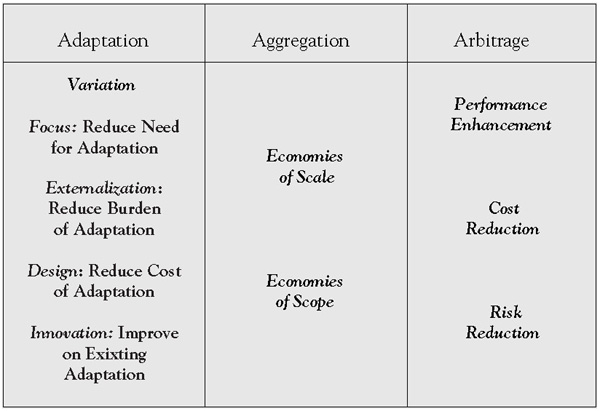
Another benefit from expertise and craftsmanship can be found in economics. Economies of Scope is a term from the world of business. You have probably heard of Economies of Scale, where you have a few products and you try to have bigger factories and bigger machines to pump out the same product in large quantities which would mean cheaper costs.
For example, you can have a factory that makes 3 types of sandwiches. You purchase bigger machines and improve your processes as much as possible to make those 3 sandwiches as fast as possible and remove all possible waste.
Economies of Scope, on the other hand, is a system where you try to produce different and varied products at a cheaper price. For example, take Subway. You can go in one and produce a high variety of sandwiches at slightly higher price than if you would buy a prepackaged sandwich in a shop.
The idea with Economies of Scope is to break down the process of creating new products into sub-processes that have a very defined scope and then set up communication systems to co-ordinate between those defined processes as well as have some synergy between them.
4.2 Simplicity
A complex system is difficult to work with. It is also difficult to work in a mess. Now complexity doesn't exactly equal a mess, but both of them are not an ordered and organised system. So (complexity or mess) is Chaos and not Order, in this context.
For us to get to order, we need to simplify the system by organising the mess with rules. Too many rules, lead to complexity, so once there, we need to either remove unneeded rules or find patterns or philosophies to the rules and use those to simplify the system.
Art is not a study of positive reality, it is the seeking for ideal truth.
- John Ruskin
Once your system is simple - not a mess, not complicated and not complex - it has a 'clean' and 'this just looks right' feeling to it. This might be called the aesthetics of simplicity.
Similar to 'clean code' and 'clean architecture' this philosophy of aesthetics has an innate feeling in it that something is beautiful and right.
The Tea Room
I would like to include diagrams to this aesthetic. Systems diagrams, network diagrams, database diagrams, business logic/rules diagrams - these need to be included in the art of 'clean and simple'.
When those objectives are reached, the systems, network, databases and business logic/rules may also be clean and simple - to understand, use, operate and make changes to. Please give it a try and see if it instinctively makes sense to you.
4.3 Transparency
To see clearly is poetry, prophecy and religion all in one.
- John Ruskin
Transparency is ultimately, the best way to prevent fiefdoms from occurring. Fiefdoms usually silo and represent information to other parts of the company to benefit itself.
For example, lets say an unethical manager would like a talented individual to stay in their division. That manager can simply not promote that individual and even give negative reviews to keep them where they are.
If, however, HR had access to objective metrics about all the employees, they could see that that person produced good work and has been in there position for some years. They would promote that person before they move to another company.
Some metrics that help can be included in Transparency:
This framework has a definition for an old role: Managers and a new role which I felt should be included that I call: Technical/Business Analyst. Both are very important for the framework, so I will explain them now.
5.1 Technical Business Analyst
Business Analysts seem to be something that only large companies have and there has been some huge innovation in documenting and expressing business knowledge in the last 5 years. We all need to start using this skill set to explain and diagram requirements and business knowledge, no matter the company size.
Business Process Modelling Notation 2.0 and Decision Modelling Notation could well be the next innovation in bridging the dialog between business and IT.
5.1.1 Story: Requirements Diagram
I was trying out using decision tables to document requirements. I talked with the Product Manager and asked her to give it a try. She took a ticket that a developer quoted as taking 5-8 days to implement. She went over the requirements and built a decision table in excel. She then showed it to the original developer, who said: "If this is all that is required, then it should take 1-2 days to implement".
5.1.2 Story: Pyramid of Doom
I was working on a way to document technical processes. I went over some code and found an if-then-else "pyramid of doom" in it. I then tried to put the conditions from the code into a decision table. After I was finished, I showed it to the original developer and he instantly understood it and made a correction to the table. I then proceeded to tell the business analysts in the company that were extremely impressed that that developer understood it so quickly. Apparently, they have had difficulties communicating business requirements to him before.
In the old way BPMN 1.0, mapping a process would look something like this:
I am sure, everyone has ran into something like this glued to a wall in an office. It's not very clear what is going on.
What happens in BPMN 2.0 and DMN, is as follows:
Decision Table - Discount Decision
And then, the process mapping is simplified:
BPMN 2.0 - Notice the small square/hash icon in the discount decision
The magic happens in three different ways:
The business logic is captured in an easy to understand way for the business user (notice, its in Excel)
That same decision table is understood by the developer
The process mapping is now easy to understand and therefore easier to understand more parts of the system.
We've gone over the business side, but we can go a bit further and apply this same process mapping to the technical side:
DMN for a Technical Process
So when you go into the 'Process Order' task from the diagram above, you would goto a technical process diagram listed below:
DMN for a Technical Process
Technical Business Analyst should be the ones to go over both and create both of these types of diagrams and tables. This should achieve a couple of things:
Provide a counter-balance and due diligence to new business requirements: "I understand you would like this new feature. Could you please explain to me in detail what it is that you need?"
Reduce the time groups of developers spend next to whiteboards.
Reduce risk by using decision tables to notice scenarios that were not considered: "We have Active for CustomerStatus, but I don't see a scenario where the OrderStatus is suspended."
Reduce the meetings between developers and business users.
Reduce the scope that developers need to work on and increase focus on a specific task.
Create a system of business and technical documentation.
TBAs should spend time going over the backlog of tickets. This should increase the velocity of the team if the tickets are very well defined.
When a new ticket is taken on by the team, a developer and a QA engineer should pick up the same ticket: The QA should start writing functionality tests based on the scenarios in the decision table and the developer should write the code and test it against those tests.
Finding and fixing a software problem after delivery is often 100 times more expensive than finding and fixing it during the requirements and design phase
Current software projects spend about 40 to 50 percent of their effort on avoidable rework.
About 80 percent of avoidable rework comes from 20 percent of the defects
In addition, this role should also prevent or at least greatly reduce cancelled projects or priority changes. I understand that these are extremely demoralising for developers.
Let us finish up by going over the framework values with this role:
Competency: This is a new role for most small-to-medium companies. It should streamline the development process by adding an expert into the right area and reducing the scope of work for other people in the company.
Simplification: Having easy to understand diagrams and documentation simplifies development work. TBAs should also identify parts of the system that could be simplified (value stream mapping) and suggest very specific and narrow work for technical debt.
Transparency: TBAs should make the whole system easy to understand for both IT and business users, outside of it.
5.2 Managers
I would like to start off with saying that managers do not equal team leaders. In the developer-centric companies, there are very few managers and there are mainly team leaders: developers that have been promoted to lead other developers.
Dilbert.com
It is no secret that people do not like managers that have no idea about their technical role. In addition, there was a study that determined that 65% of managers actually produced negative value for the company. On the other side, good managers produce huge value (Pareto Principle) for the company and it should not be something we write-off.
Currently, with the lack of managers in IT companies, there is a reliance on hiring someone who 'is the right fit' and are basically outsourcing the need to manage to the individual. If they don't work well, then there is something wrong with them.
In the context of a Capitalistic/Democracy, what role would managers play?
Well, in a Democracy, there is a need for Law-makers to make systems for people to interact in a helpful way to society. There is also a need for Courts for dispute resolution.
Managers should think of systems inside the company that promote honesty, tolerance and freedom of speech. Managers should also resolve disputes in the company and look for workplace complications before they become a full blown warring tribe. Bear in mind, that this framework encourages experts and experts usually have opinions.
Following the values of the framework, lets go over what a manager should do:
Competency: The manager should be competent enough at coming up with social systems that are effective for that specific company culture. The idea is that the cogs turn smoothly.
Simplification: The manager should set out rules in those systems, but set out very few rules and then enforce them. With regards to communication, less is more. The manager should make sure that a group can handle things in their own expertise and scope and try to reduce communication dependancies.
Transparency: The manager should implement metrics gathering to both know how the IT company is performing, but also be transparent to stakeholder outside IT and build trust with them.
6. Applying the Pattern
Let's take three measures of the output of a system to see how these philosophies could work: Speed, Control and Quality.
6.1 Speed
Competency: If we have experts, then we can make the best choices to build the products instead of trying out many choices until we reach the right one.
Simplification: If we simplify the system as much as we can, we can both integrate new systems faster as well as produce easy to use systems. In a lot of ways, simplifying equals business agility as it helps you change the business faster to meet the needs of the marketplace.
Transparency: If we have metrics that show us were bottleneck are in the system, we can make those systems as fast as possible.
6.2 Control
Competency: If we have a high degree competency for a defined scope and area, then we have a high degree of control over the system.
Simplification: If the system is simplified, it is easy to use it.
Transparency: If the movement of work is transparent, we can see monitor the time it takes to exchange communication and complete work in the system. Another way of looking at it is that one cog is moving slower and is slowing the system down. Ultimately, this is where a manager would need to step in.
6.3 Quality
Competency: If we have craftsmen, the cogs they produce are of high quality.
Simplification: If the products we deliver have been simplified, it provides an easy to use product for the customer (perceived quality).
Transparency: If we have metrics to see how popular the new product is and how it is used, we can improve the quality of that product. Ultimately, this will need direction from 'the business' and would require interaction with Technical Business Analysts (TBAs in the diagram).
Quality is never an accident. It is always the result of intelligent effort.
- John Ruskin
7. F.A.Qs
Is this system a replacement for Agile?
No, its completely complementary to it and would probably better serve the principle of having 'multi disciplinary teams'.
How do you prioritise or expedite work in this system?
That would be up to the manager. Technically, if you would like the option of expediting, you would need to leave some spare capacity in the teams.
What if there is not enough skill in house?
If you don't have the skills you need in the company, then consider bringing in an outside consultant - even if its for a few days. You will not gain new innovations, but you will gain from other company's experience.
What would happen there isn't enough work to justify a new field?
It could be very possible to let one person in the company have a dual-role and still have time to try and innovate in this new field.
How can I split up an area of expertise without it leading to a huge overhead of communication?
That would really depend on you and your needs. You need to find a balance of 'less is more' with regards to communication, but also have enough work concentrated in front of an expert for them to recognise patterns and generate innovation.